
Property operations
Every unit, every channel, one timeline.
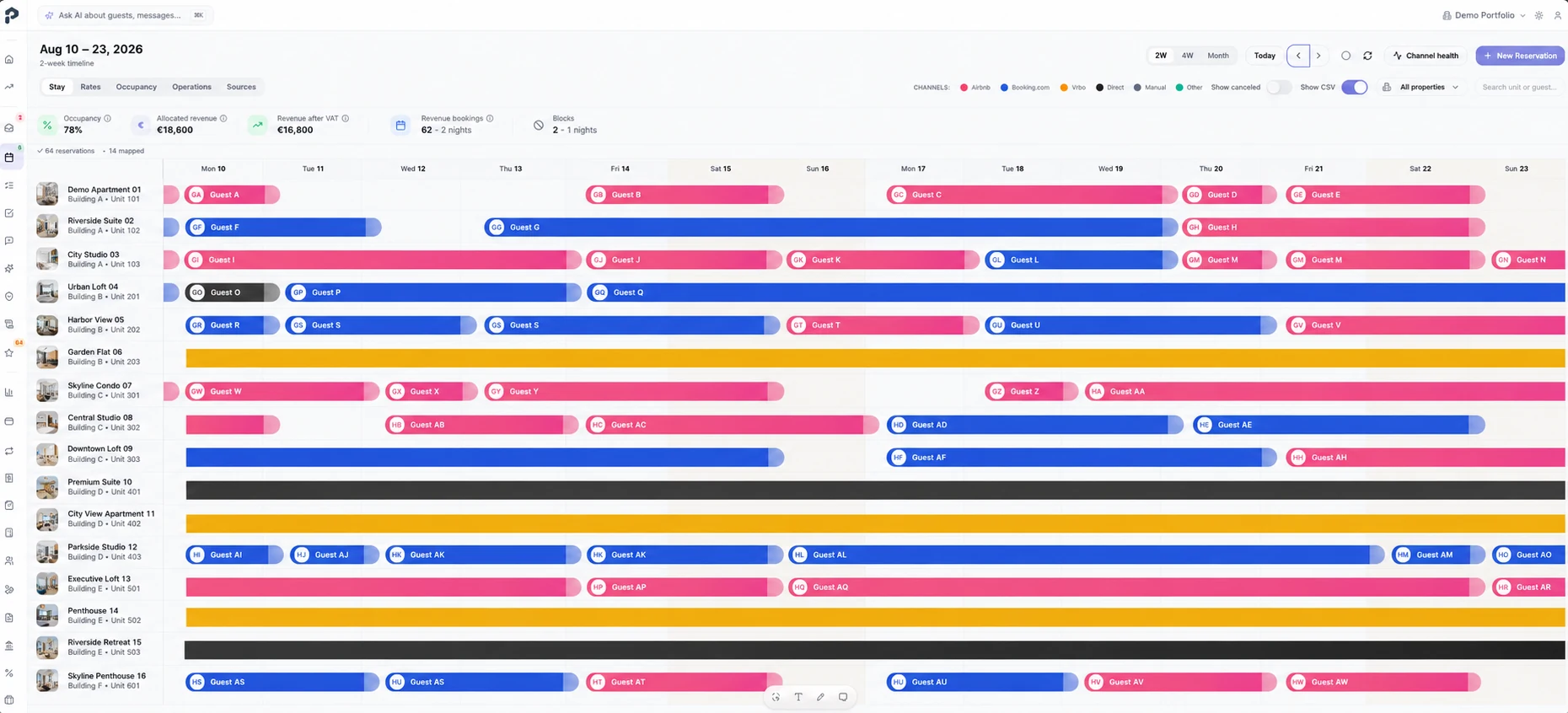
Stays, blocks and occupancy across the whole portfolio sit on one timeline, colour-coded by source channel. Each reservation opens into its money, its documents and the operational steps still outstanding.
- Portfolio timeline
- Channel colours
- Gaps and blocks
- Reservation states
No credit card required
Inside the product
A calendar that carries the operation, not just the dates
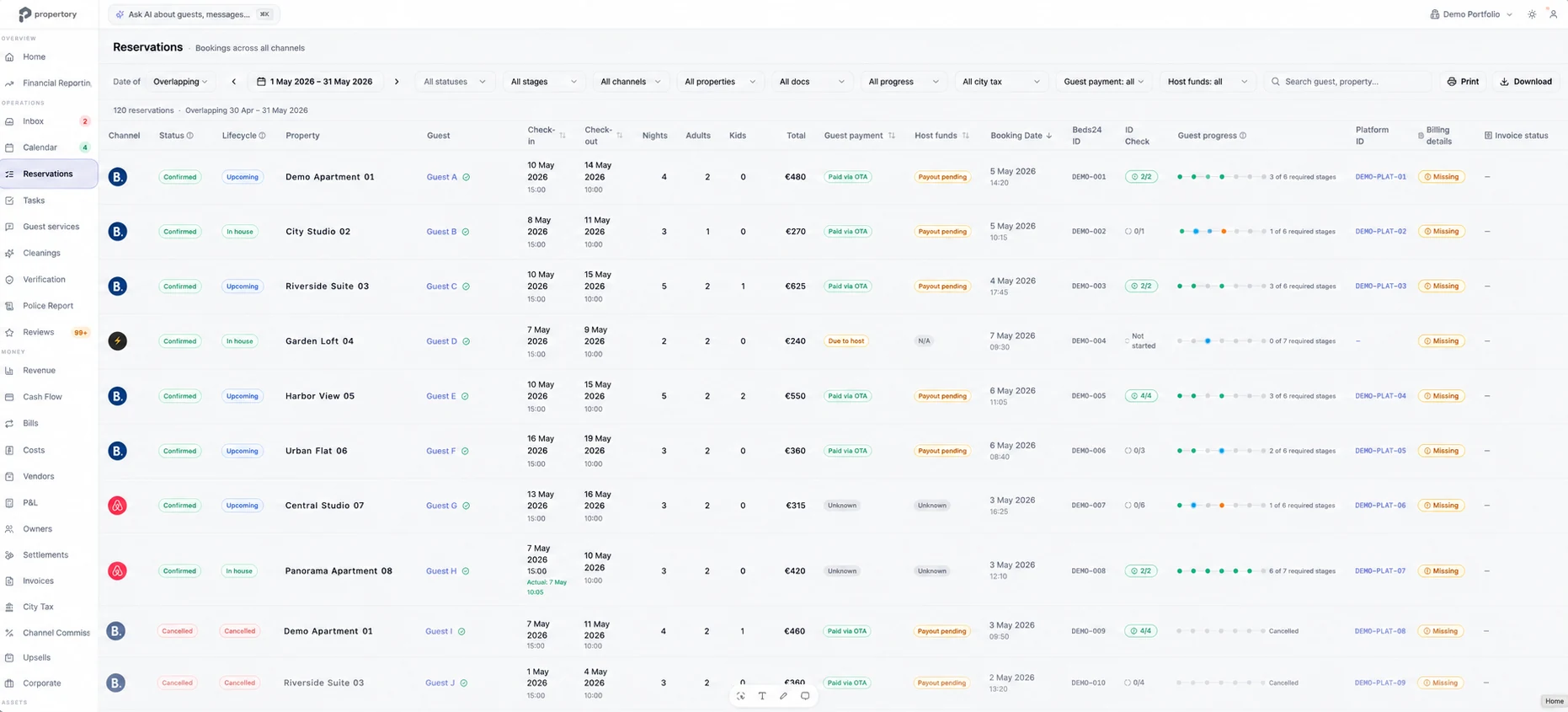
The timeline shows where the portfolio actually stands; the reservation table shows what still has to happen before each stay is safe.
- 1Channel-coded staysEvery booking is colour-coded by the platform it came from, across buildings.
- 2Gaps you can seeEmpty nights and blocks are visible at portfolio scale instead of unit by unit.
- 3Operational statePayment, city tax, document checks and guest progress per reservation.
How it works
One accountable trail, end to end
- 01 · Sync
Reservations arrive from your channels
Propertory uses Beds24 for reservation and channel connectivity, so the bookings you already take flow in without re-entry.
- 02 · See
The portfolio on one timeline
Filter by building, unit or channel and read occupancy, blocks and changes without opening five extranets.
- 03 · Act
Changes drive the work
When a stay moves, the reservation record moves with it — and so do the operational steps hanging off it.
Capabilities
What you get
Portfolio-wide timeline
Every unit on one screen instead of one calendar per listing.
Source channel at a glance
Colour coding shows where each stay came from without opening it.
Filters that match your structure
Narrow by building, unit or channel when the portfolio grows past what fits on a screen.
Reservation operations table
Status, lifecycle, guest payment, host funds, city tax and document checks in one filterable list.
Guest progress per stay
See which stays still need verification, payment or arrival details before check-in.
Honest connectivity
Propertory does not replace your channel manager; it reads reservation and channel data through Beds24.
Before and after
Disconnected tools versus one platform
Today, without Propertory
- One calendar per listing, per platform, with a spreadsheet on top.
- A date change nobody notices until the cleaner arrives.
- Payment and tax status live in a different system to the booking.
With Propertory
- One timeline for the whole portfolio, colour-coded by channel.
- The reservation record updates and the work attached to it follows.
- Money and document state read from the same reservation row.
Who it is for
What each team gets
Property manager
A portfolio-level read of occupancy, gaps and stays that are not yet operationally ready.
Guest support
The stay context needed to answer a question without asking a colleague.
Finance
Payment, host funds and city tax visible against the reservation that produced them.
Questions
Frequently asked questions
Where do the reservations come from?
From the channels you already distribute on, via Beds24 reservation and channel connectivity.
Can I see more than one building at a time?
Yes. The timeline covers the whole portfolio and filters by building, unit or channel.
What does the reservation table show beyond dates?
Status, lifecycle, guest payment, host funds, city tax, document checks and guest progress.
Does a date change update the rest of the operation?
Yes. The reservation record is the single source, so the work attached to it follows the change.
Transparent pricing
€15 per property per month. Start with a 14-day trial.
AI is included under fair use. No credit card, no setup fee and no per-module upsell.